- Pagina inicial /
- Eletrónica /
- Acessórios para Computador /
- Computer Accessories & Peripherals /
- Keyboards, Mice & Accessories /
- Teclados de Computador /
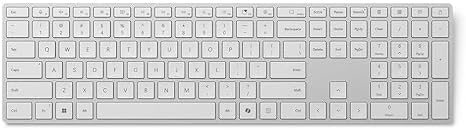
- Microsoft Surface Keyboard (2nd Edition)
0 ratings




Artigo n.º:
95844458
Microsoft Surface Keyboard (2nd Edition)
88% of respondents would recommend this to a friend
Artigo n.º:
95844458
CVE 17593
Detalhes do Preço
Excluindo custos de envio e alfandegários ( Os custos de envio e alfandegários serão calculados na finalização da compra )
*Todos os artigos serão importados de EUA
0 ratings
Escrever uma avaliação
100+ comprado
Em stock
 Importado da loja USA
Qtd.:
Encomende já e receba por volta de Sábado, Novembro 07
Transação segura
A Ubuy trabalha arduamente para proteger a sua segurança e privacidade. O nosso sistema avançado de segurança de pagamentos garante a confidencialidade ao encriptar as suas informações durante a transmissão, utilizando os protocolos AES (Normas de Encriptação Avançada) e SSL (Camada de Sockets Seguros). Os seus dados de pagamento estão 100% seguros, pois não partilhamos os seus dados de pagamento com vendedores terceiros.
Os nossos principais Parceiros Logísticos


Fast
Shipping

Devolução
gratuita*

Embalagem Segura

Produtos 100% Originais

Certificação PCI DSS

Certificação ISO 27001



Nota: Down Necessário transformador redutor de tensão para utilização de produtos eletrónicos da EUA loja (110 V-120 V). Conversores de potência recomendados COMPRAR AGORA.


Detalhes do produto
| Compatible Devices | Laptop |
| Connectivity Technology | Bluetooth |
| Additional Features | Ergonomic |
| Keyboard Backlighting Color Support | Single Color |
| Language | English |
| Number of Batteries Required | 2 |
| Power Source | Battery Powered |
| Switch Type | Tactile |
| Keyboard Layout | QWERTY |
| Hand Orientation | Ambidextrous |
| Minimum Required Operating System Version | Windows 11 |
| Compatible Operating System Family | Windows |
| Compatible Tablet Computer Models | Microsoft Surface Pro 7 |
| Number of Keys | 104 |
| Color | Gray |
| Item Dimensions L x W x H | 17.15"L x 5.15"W x 1"H (43.6 x 13.1 x 2.5 cm) |
| Enclosure Material | Plastic |
| EU Spare Part Availability Duration | 1 years |
| Brand | Microsoft |
| Keyboard Description | Numeric |
| Antenna Location | Business |
| Built-In Media | Keyboard, 2 AAA alkaline batteries (included) |
| Model Number | EP2-04209 |
| Model Name | EP2-04209 |
| Manufacturer | Microsoft |
| Number of Packs | 1 |
| UPC | 196388386758 |
| Number of Items | 1 |
| Mfr Part Number | EP2-04209 |
| Recommended Uses For Product | Business |
| Special Feature | Ergonomic |
| Keyboard backlighting color support | Single Color |
| Product Dimensions (L x W x H) | 17.15"L x 5.15"W x 1"H (43.6 x 13.1 x 2.5 cm) |
| Material | Plastic |
| Package Weight | 5 Pound |
O que está incluído na caixa
Keyboard, 2 AAA alkaline batteries (included)
DESCRIÇÃO DO PRODUTO
Tem alguma Dúvida? Converse connosco
Perguntas e respostas do cliente
-
Pergunta:
Como comprar Microsoft Surface Keyboard (2nd Edition) online na Ubuy?
Resposta: É fácil comprar Microsoft Surface Keyboard (2nd Edition) online na Ubuy.. Você só precisa procurar o produto, escolher a forma de envio na hora de finalizar a compra e receber no seu endereço. -
Pergunta:
Microsoft Surface Keyboard (2nd Edition) está disponível para compras online em Cabo Verde?
Resposta: Sim, na Ubuy Cabo Verde este produto está disponível para você comprar a um preço razoável.. O Microsoft Surface Keyboard (2nd Edition) não está disponível localmente, mas você pode confiar em nós com nossos serviços de remessa expressa. -
Pergunta:
Quanto tempo leva para receber o produto após fazer o pedido?
Resposta: O tempo de entrega do seu produto encomendado varia de acordo com o que você pediu e o método de envio que você escolheu.. O tempo estimado de entrega é mencionado durante o processo de checkout, portanto, fique despreocupado ao fazer compras.
Microsoft Keyboards EP2-04209 Editorial Review
Nenhuma análise editorial encontrada
Avaliações e Classificações dos Clientes
47 classificações de clientes
-
5 Estrela
88%
-
4 Estrela
4%
-
3 Estrela
0%
-
2 Estrela
3%
-
1 Estrela
5%
Avaliar este produto
Partilhe as suas ideias com outros clientes
CONFIANÇA NA PLATAFORMA E SEGURANÇA DO COMPRADOR

BS
Beat
Comprador verificado
“Simple process, tax and import duties announced by email. Paid online. Delivery was quick. Can recommend.”
22 October 2026 · via Trustpilot
S
Songpon
Comprador verificado
“The product met my expectations perfectly. The ordering process was convenient and easy, and I was kept updated on the delivery status throughout the shipping process. The delivery was also very fast. I can confidently confirm that Ubuy provides an excellent shopping and delivery experience. Highly recommended! From Thailand”
22 October 2026 · via Trustpilot
D
Dimitra
Comprador verificado
“Quick and efficient delivery and the possibility to get the package delivered from a pick-up point. I'm very happy with my experience and would recommend it again!”
22 October 2026 · via Trustpilot
HJ
Heer
Comprador verificado
“My product came in good condition from the USA. I was happy that I could buy via this Chanel and that DHL brought it to my house. The communication is fine. The charger works very well. Fast and my Samsung watch and Samsung airbuds and Samsung Fold 8 Ultra all charge fast.”
22 October 2026 · via Trustpilot
SF
Sergey
Comprador verificado
“Hello Ubuy team, thank you so much for the excellent service! I received the package today; it arrived in great condition and was packed very neatly. The delivery was fast, and the courier was very friendly as well. Wishing continued success to Ubuy and the entire team!”
23 October 2026 · via Trustpilot
PORQUÊ COMPRAR CONNOSCO
Checkout Seguro
Entrega Global
Devoluções Fáceis
Produtos Genuínos
Customers also viewed these products
Histórico de preços do produto
Informação importante
- Limitações: para produtos expedidos internacionalmente, tenha em atenção que qualquer garantia do fabricante pode não ser válida; opções de serviço do fabricante podem não estar disponíveis; manuais de produtos, instruções e avisos de segurança podem não estar nas línguas do país de destino; os produtos (e materiais que o acompanham) pode não ter sido concebido em conformidade com as normas, especificações e requisitos de rotulagem do país de destino; e os produtos podem não estar em conformidade com a voltagem e outras normas elétricas do país de destino (requerendo assim o uso de um adaptador ou conversor caso seja apropriado). O destinatário é responsável por garantir que o produto pode ser legalmente importado para o país de destino. Quando encomenda à Ubuy ou aos seus afiliados, o destinatário é o importador de registo e deve estar em conformidade com todas as leis e regulamentos do país de destino.
- Nem todos os produtos listados na Ubuy estão à venda, uma vez que a Ubuy é um motor de busca global. Os produtos estão sujeitos a leis de exportação/comércio.
CVE 17593
Encomende já e receba por volta de Sábado, Novembro 07
Este artigo não está restrito no meu país. (Clique no link acima se este artigo não estiver restrito no seu país, para que a nossa equipa o analise e permita.)
Qtd.:
Transação segura
Em conformidade com a norma PCI DSS e com certificação ISO 27001:2022, com pagamentos encriptados e proteção total do comprador em todas as encomendas.
Os nossos principais Parceiros Logísticos
Entrega internacional mais rápida
Ubuy Assurance
Experience worry-free shopping with 100% original products, PCI DSS-compliant payment security, ISO 27001-certified data protection, the fastest cross-border delivery, free returns *, and secure packaging on every order.