- Pagina inicial /
- Produtos de Escritório /
- Eletrónica de Escritório /
- Scanners e Acessórios /
- Scanners /
- Scanners de Documentos /
- Epson Workforce ES-400 Color Duplex Document ...
0 ratings





Artigo n.º:
3366799
Epson Workforce ES-400 Color Duplex Document Scanner for PC and Mac, Auto Document Feeder (ADF)
86% of respondents would recommend this to a friend
Artigo n.º:
3366799
CVE 50198
Detalhes do Preço
Excluindo custos de envio e alfandegários ( Os custos de envio e alfandegários serão calculados na finalização da compra )
*Todos os artigos serão importados de EUA
0 ratings
Escrever uma avaliação
Em stock
 Importado da loja USA
Qtd.:
Restam apenas 5 artigos em stock.
Encomende já e receba por volta de Sexta-Feira, Outubro 09
Transação segura
A Ubuy trabalha arduamente para proteger a sua segurança e privacidade. O nosso sistema avançado de segurança de pagamentos garante a confidencialidade ao encriptar as suas informações durante a transmissão, utilizando os protocolos AES (Normas de Encriptação Avançada) e SSL (Camada de Sockets Seguros). Os seus dados de pagamento estão 100% seguros, pois não partilhamos os seus dados de pagamento com vendedores terceiros.
Os nossos principais Parceiros Logísticos


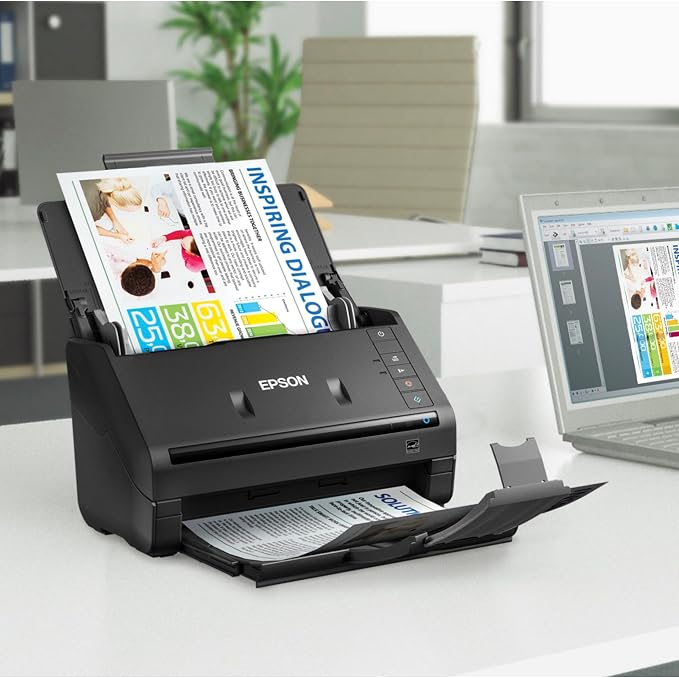
Get organized in a snap scan upto 35 ppm/70 ipm (1); Single Step Technology captures both sides in one pass

Fast
Shipping

Devolução
gratuita*

Embalagem Segura

Produtos 100% Originais

Certificação PCI DSS

Certificação ISO 27001



Note: Step Down Voltage Transformer required for using electronics products of EUA store (110-120). Recommended power converters COMPRAR AGORA.


O que se Destaca
Fast Scanning
Achieve quick, high-quality scans with speeds up to 35 pages per minute, enhancing productivity for busy professionals and offices.
Duplex Scanning
Effortlessly scan both sides of documents simultaneously, saving time and ensuring efficiency for double-sided materials.
Auto Document Feeder
The 50-sheet ADF allows for continuous scanning of multi-page documents, minimizing manual handling and streamlining workflows.
Detalhes do produto
- Scan up to 35 ppm/70 ipm with Single-Step Technology
- 50-page Auto Document Feeder for stacks of paper, business/ID cards, receipts, etc.
- Includes Epson ScanSmart Software and TWAIN driver for easy scanning and compatibility with document management software
- Built-in Nuance Optical Character Recognition for searchable PDFs and editable Word and Excel files
- Easily share and collaborate by scanning to popular cloud storage services
- Features reliable paper feeding system, intelligent color/image adjustments, and optional Network Interface Unit
| Scanner Type | Document |
| Connection Type | USB |
| Resolution | 1200 |
| Wattage | 17 watts |
| Color Depth | 24 bits |
| Standard Sheet Capacity | 50 |
| Optical Sensor Technology | CCD |
| Greyscale Depth | 16-bit input/8-bit output (40.6 cm) |
| Media Type | Photo ; Receipt ; Business Card ; Paper |
| Item Dimensions D x W x H | 12.6"D x 11.6"W x 12.3"H (32 x 29.5 x 31.2 cm) |
| Item Weight | 3670 g |
| Minimum System Requirements | Windows 2000 Professional |
| Brand | Epson |
| Model Name | WorkForce ES-400 |
| UPC | 010343920309 |
| Unit Count | 1 Count |
| Global Trade Identification Number | 00010343920309 |
| Built-In Media | AC adapter and power cable, ES-400 Document Scanner, Start Here poster, SuperSpeed USB cable |
| Item Type Name | Epson WorkForce ES-400 Color Duplex Document Scanner for PC and Mac, Auto Document Feeder (ADF) |
| Manufacturer | Epson |
| Connectivity Technology | USB |
| Product Dimensions (L x W x H) | 12.6"D x 11.6"W x 12.3"H (32 x 29.5 x 31.2 cm) |
O que está incluído na caixa
ES-400 Document Scanner
Start Here poster
SuperSpeed USB cable
AC adapter and power cable
Quem Deverá Comprar?

-
Office Professionals
Ideal for busy professionals needing to scan, organize, and manage documents efficiently in a fast-paced environment.
-
Students and Researchers
Great for students who need to digitize notes and research materials for easy access and organization.
-
Small Business Owners
Perfect for small business owners needing to document and store receipts, contracts, and essential paperwork promptly.

-
Occasional Users
Not suitable for infrequent use, as its features may be underutilized and not cost-effective for rare scanning.
DESCRIÇÃO DO PRODUTO
Tem alguma Dúvida? Converse connosco
Perguntas e respostas do cliente
-
Pergunta:
What are the key features of the Epson WorkForce ES-400 scanner?
Resposta: The Epson WorkForce ES-400 is designed to offer high-performance scanning with features like fast color duplex scanning at up to 35 pages per minute. It boasts an Auto Document Feeder (ADF) that can hold up to 50 sheets, making bulk scanning tasks seamless. The scanner is compatible with both PC and Mac systems, ensuring versatility for various users. This device is ideal for professionals who need reliable and efficient document management, such as in offices that handle large volumes of paperwork. -
Pergunta:
How does duplex scanning work on the ES-400?
Resposta: Duplex scanning on the Epson WorkForce ES-400 allows you to scan both sides of a document in a single pass. This feature uses advanced technology to capture the front and back of pages simultaneously, which significantly reduces scanning time compared to traditional single-sided scanning. It is particularly useful for businesses that often deal with double-sided documents, such as contracts or reports, streamlining the workflow and enhancing productivity. -
Pergunta:
Is the Epson WorkForce ES-400 compatible with mobile devices?
Resposta: Yes, the Epson WorkForce ES-400 supports mobile scanning through the Epson DocumentScan app. This app allows you to connect your smartphone or tablet to the scanner, enabling you to scan documents directly to your device or cloud storage. This functionality is valuable for users who need to manage documents on-the-go, making it ideal for business professionals and students who need to digitize documents while away from their primary workstation. -
Pergunta:
What types of documents can I scan with the ES-400?
Resposta: The Epson WorkForce ES-400 is versatile and can scan a variety of document types, including single sheets, multi-page reports, business cards, and receipts. Its sturdy design accommodates documents of differing sizes and thicknesses, allowing you to efficiently manage paperwork in various formats. This makes it an ideal choice for professionals in fields like finance or legal, where maintaining organized and accessible document records is critical. -
Pergunta:
What is the scanning resolution of the Epson ES-400?
Resposta: The Epson WorkForce ES-400 offers an optical resolution of up to 600 dpi, which ensures that scanned documents are crisp and clear. The high resolution is essential for capturing fine details in text and images, making it suitable for both standard document scanning and high-quality graphics. Users in creative fields, such as graphic design or photography, will find this feature particularly beneficial for preserving image quality during digital archiving. -
Pergunta:
Do I need any special software to use the ES-400?
Resposta: No special software is required to use the Epson WorkForce ES-400. It is compatible with standard scanning applications on both PC and Mac platforms. The scanner comes with Epson Scan and Document Capture Pro software, which allows for easy management and editing of scanned documents. This makes it user-friendly for those in administrative roles who may not be tech-savvy yet still need to digitize and organize files efficiently. -
Pergunta:
Can the ES-400 scan in color?
Resposta: Yes, the Epson WorkForce ES-400 is capable of scanning in full color. Its advanced scanning technology captures vibrant, true-to-life colors in high-quality detail. This feature is crucial for users who need to digitize colored documents, images, or graphics. It’s especially beneficial for businesses in marketing or graphic design, where color accuracy is essential for maintaining brand integrity in digital files. -
Pergunta:
What connectivity options does the ES-400 offer?
Resposta: The Epson WorkForce ES-400 offers USB 3.0 connectivity for fast data transfer along with compatibility for various cloud storage services. This flexibility allows easy integration into office networks and enables users to scan documents directly to cloud locations or linked devices. Such capabilities are particularly useful in team environments where quick access to scanned documents is vital for collaboration and productivity. -
Pergunta:
How does the Auto Document Feeder (ADF) enhance scanning productivity?
Resposta: The Auto Document Feeder (ADF) on the Epson WorkForce ES-400 allows you to load multiple pages at once—up to 50 sheets—enabling uninterrupted scanning of large batches. This significantly increases productivity for both individuals and businesses as it minimizes the need for manual feeding. It's ideal for busy office environments or home users managing numerous documents, allowing for quicker project completion without sacrificing quality. -
Pergunta:
Where can I buy the Epson WorkForce ES-400 Color Duplex Document Scanner?
Resposta: You can purchase the Epson WorkForce ES-400 Color Duplex Document Scanner for PC and Mac from Ubuy in Cabo Verde. Ubuy offers a convenient platform for locating the scanner, with options for fast checkout and reliable customer service, ensuring a smooth shopping experience for your document management needs.
Epson Document Scanners Editorial Review


The Epson WorkForce ES-400 Color Duplex Document Scanner is a suitable business-grade scanner for home and small business users that can handle mixed paper sizes. It includes drivers for enterprise document management software. The driver and bundled software allow the user to add more pages to what has already been scanned, reorder, delete, and add more pages before saving the file. The scanner is compatible with Windows 7, 8.x (32-bit, 64-bit), Vista (32-bit, 64-bit), XP SP3 (32-bit), XP Professional x64 Edition, and Mac OS X 10.5.8 – 10.13.x. The scanner can scan to cloud services and requires an internet connection for software download and installation. It is fast and produces clear scans, but it tends to jam when a large stack of documents is loaded, and the 400II version does not connect wirelessly. The scanner comes with an app that is easy to navigate but does not have enough features to make tracking of receipts easier.
Avaliações e Classificações dos Clientes
1465 classificações de clientes
-
5 Estrela
81%
-
4 Estrela
10%
-
3 Estrela
3%
-
2 Estrela
1%
-
1 Estrela
5%
Avaliar este produto
Partilhe as suas ideias com outros clientes
Prós
- Suitable for home and small businesses
- Scans mixed paper sizes
- Compatible with multiple operating systems
- Can scan to cloud services
- Produces clear scans
Contras
- Tends to jam with large stacks of documents
CONFIANÇA NA PLATAFORMA E SEGURANÇA DO COMPRADOR

JK
Jasmin
Comprador verificado
“Great products and very good service: very easy and very fast international delivery.”
9 September 2026 · via Trustpilot
AG
Anke
Comprador verificado
“Wonderful online shopping experience, smooth transaction from the start. Payment method works conveniently and delivery is unexpectedly fast and reliable. You go the extra mile for service. What makes this even more amazing, you deliver to Namibia. I will remain a happy Ubuy customer and will increase my purchases for sure! Thank you!”
10 September 2026 · via Trustpilot
H
Hazel
Comprador verificado
“Very easy to find the products what you need, and so fast delivery, that’s why I highly recommended to others costumers to used ubuy.”
10 September 2026 · via Trustpilot
O
Opaleye
Comprador verificado
“I received exactly what I ordered I was skeptical about your site because that was my first time to order. But the order came timely and neatly packaged. I was not disappointed. Thank you.”
11 September 2026 · via Trustpilot
AC
Adele
Comprador verificado
“Easy to find and order what you want on the website. Delivery is quick to the UK”
8 September 2026 · via Trustpilot
Checkout Seguro
Entrega Global
Devoluções Fáceis
Produtos Genuínos
Histórico de preços do produto
Informação importante
- Limitações: para produtos expedidos internacionalmente, tenha em atenção que qualquer garantia do fabricante pode não ser válida; opções de serviço do fabricante podem não estar disponíveis; manuais de produtos, instruções e avisos de segurança podem não estar nas línguas do país de destino; os produtos (e materiais que o acompanham) pode não ter sido concebido em conformidade com as normas, especificações e requisitos de rotulagem do país de destino; e os produtos podem não estar em conformidade com a voltagem e outras normas elétricas do país de destino (requerendo assim o uso de um adaptador ou conversor caso seja apropriado). O destinatário é responsável por garantir que o produto pode ser legalmente importado para o país de destino. Quando encomenda à Ubuy ou aos seus afiliados, o destinatário é o importador de registo e deve estar em conformidade com todas as leis e regulamentos do país de destino.
- Nem todos os produtos listados na Ubuy estão à venda, uma vez que a Ubuy é um motor de busca global. Os produtos estão sujeitos a leis de exportação/comércio.
CVE 50198
Encomende já e receba por volta de Sexta-Feira, Outubro 09
Este artigo não está restrito no meu país. (Clique no link acima se este artigo não estiver restrito no seu país, para que a nossa equipa o analise e permita.)
Qtd.:
Restam apenas 5 artigos em stock.
Transação segura
Em conformidade com a norma PCI DSS e com certificação ISO 27001:2022, com pagamentos encriptados e proteção total do comprador em todas as encomendas.
Os nossos principais Parceiros Logísticos
Entrega internacional mais rápida
Ubuy Assurance
Experience worry-free shopping with 100% original products, PCI DSS-compliant payment security, ISO 27001-certified data protection, the fastest cross-border delivery, free returns *, and secure packaging on every order.