- Pagina inicial /
- Eletrónica /
- Acessórios para Computador /
- Computer Accessories & Peripherals /
- Keyboards, Mice & Accessories /
- Mice /
- Mouse Button Board Replacement Come with D2FC...
0 ratings


Artigo n.º:
18775640
Mouse Button Board Replacement Come with D2FC-F-7N(50M) Micro Switch Compatible for G900 G903 Mouse
90% of respondents would recommend this to a friend
Artigo n.º:
18775640
CVE 2020
Detalhes do Preço
Excluindo custos de envio e alfandegários ( Os custos de envio e alfandegários serão calculados na finalização da compra )
*Todos os artigos serão importados de EUA
Em stock
 Importado da loja USA
Qtd.:
Encomende já e receba por volta de Sexta-Feira, Setembro 25
Transação segura
A Ubuy trabalha arduamente para proteger a sua segurança e privacidade. O nosso sistema avançado de segurança de pagamentos garante a confidencialidade ao encriptar as suas informações durante a transmissão, utilizando os protocolos AES (Normas de Encriptação Avançada) e SSL (Camada de Sockets Seguros). Os seus dados de pagamento estão 100% seguros, pois não partilhamos os seus dados de pagamento com vendedores terceiros.
Os nossos principais Parceiros Logísticos


Solve the failure of left and right mouse buttons, double click

Fast
Shipping

Devolução
gratuita*

Embalagem Segura

Produtos 100% Originais

Certificação PCI DSS

Certificação ISO 27001



Note: Step Down Voltage Transformer required for using electronics products of EUA store (110-120). Recommended power converters COMPRAR AGORA.


O que se Destaca
Compatibility
Seamlessly fits Logit G900 and G903 gaming mice, ensuring easy installation and reliable functionality, making it an excellent choice for gamers seeking to restore their equipment.
Durability
Designed for long-lasting use, this micro switch replacement withstands intense gaming sessions, reducing the need for frequent replacements and enhancing overall gaming performance.
Enhanced Performance
Improves button responsiveness and accuracy, giving gamers a competitive edge with quicker reaction times and a more satisfying gaming experience overall.
Detalhes do produto
| Operation Mode | ON-OFF |
| Contact Type | Normally Open |
| Connector Type | Molex |
| Switch Type | Push Button |
| Terminal | Solder |
| Circuit Type | 2-way |
| Mounting Type | PCB Mount |
| Number of Positions | 1 |
| Control Method | Push Button |
| Compatible with Vehicle Type | Gaming Mouse (Logitech G900, G903) |
| Control Type | Physical |
| Compatible Devices | Logitech G900, Logitech G903 |
| Color | Button Board with D2FC-F-7N(50M)Micro Switch for G900 G903 mouse |
| Unit Count | 2 Count |
| Number of Items | 2 |
| Material Type | Copper |
| Contact Material | Copper |
| Brand Name | HUYUN |
| Model | G900-G903 Button Board |
| Manufacturer | HUYUN |
| Brand | HUYUN |
| Material | Copper |
| Item Weight | 0.1 lbs (50 grams) |
Quem Deverá Comprar?

-
Gamers Needing Repair
Ideal for gamers with faulty buttons on G900/G903, restoring performance without purchasing a new mouse.
-
DIY Enthusiasts
Perfect for DIY enthusiasts who enjoy repairing and customizing gaming hardware with precision parts.
-
Budget-Conscious Users
Cost-effective solution for users wanting to extend the life of their expensive gaming mouse without high costs.

-
Non-Gamers
Not suitable for casual users who do not heavily rely on gaming mice for their daily computing needs.
DESCRIÇÃO DO PRODUTO
Tem alguma Dúvida? Converse connosco
Perguntas e respostas do cliente
-
Pergunta:
What is the Mouse Button Board Micro Switch Replacement for Logitech G900 and G903?
Resposta: The Mouse Button Board Micro Switch Replacement is a component designed specifically for Logitech G900 and G903 gaming mice. This replacement allows users to fix faulty or unresponsive buttons, ensuring optimal performance during gameplay. Over time, frequent use can lead to wear and tear on the buttons, and this replacement component serves as an economical solution to restore functionality without needing to buy a new mouse. -
Pergunta:
How do I install the Mouse Button Board Micro Switch Replacement?
Resposta: Installing the Mouse Button Board Micro Switch Replacement requires care and precision. Begin by disassembling your Logitech G900 or G903, ensuring you follow a guide for disassembly. Once accessed, carefully extract the old micro switch and insert the new replacement. After installation, reassemble the mouse and test the buttons to ensure they are working smoothly. A proper installation can greatly enhance your gaming experience by restoring the responsiveness of the mouse buttons. -
Pergunta:
Why should I replace the micro switch in my Logitech G900 or G903?
Resposta: Replacing the micro switch in your Logitech G900 or G903 is essential if you're experiencing issues such as button misfires, lag, or complete non-responsiveness. These problems can hinder your gameplay, and replacing the micro switch helps you regain that competitive edge. Additionally, performing this replacement can extend the lifespan of your mouse, allowing for better performance during those intense gaming sessions. -
Pergunta:
What tools do I need to replace the micro switch in my gaming mouse?
Resposta: To replace the micro switch in your Logitech G900 or G903, you typically need a small screwdriver set (preferably Phillips) and a pair of tweezers. Depending on the design, you might also find a spudger useful for prying open the mouse casing without damaging it. Having the right tools on hand ensures a smooth replacement process, allowing you to restore your mouse without frustration. -
Pergunta:
Can I use the Button Board Micro Switch Replacement for other mouse models?
Resposta: The Button Board Micro Switch Replacement is designed specifically for the Logitech G900 and G903 gaming mice. While other Logitech models may look similar, they often have different button configurations and micro switches, making compatibility a crucial factor. It is advisable to check specifications or consult with the manufacturer before attempting to use it with other models to avoid functionality issues. -
Pergunta:
What are the signs that my Logitech G900 or G903 needs a switch replacement?
Resposta: Common signs that indicate your Logitech G900 or G903 may need a switch replacement include buttons that do not respond consistently, double-clicking when a single click is intended, or buttons that feel mushy or stuck. If you notice any of these symptoms, it may be time to consider replacing the micro switches to restore the functionality and performance of your gaming mouse. -
Pergunta:
Is it worth performing a micro switch replacement on my Logitech G900 or G903?
Resposta: Performing a micro switch replacement is often worth it, especially if you heavily rely on your gaming mouse for competitive play. Instead of purchasing a new mouse, which can be costly, replacing the micro switches can prolong the lifespan of your device and improve your gaming experience significantly. This process can save you money while ensuring that your hardware performs at its best. -
Pergunta:
Can I buy the Mouse Button Board Micro Switch Replacement in Cabo Verde?
Resposta: Yes, you can buy the Mouse Button Board Micro Switch Replacement compatible with Logitech G900 and G903 gaming mice in Cabo Verde. Ubuy is a reliable option that provides a variety of electronic components, including this specific replacement part. Ubuy's platform often features a selection of options, making it convenient to find the right component for your needs. -
Pergunta:
What is the average lifespan of a micro switch in gaming mice?
Resposta: The average lifespan of a micro switch in gaming mice varies based on usage, but many are rated for up to 10 million clicks. However, heavy gaming can accelerate wear and tear. Factors such as usage patterns and cleaning can influence how long a micro switch lasts. If you are an avid gamer, you may need to replace the switches more frequently to maintain a responsive gaming experience. -
Pergunta:
Are there any tips for maintaining my Logitech G900 or G903 mouse?
Resposta: To maintain your Logitech G900 or G903 mouse, regularly clean it by removing dust and debris from the buttons, sensor, and scroll wheel. Keep liquids away from the mouse to prevent internal damage. Additionally, handle it gently during gameplay to minimize wear on the buttons. Proper maintenance can extend the lifespan of your mouse and improve overall performance.
HUYUN Mice Editorial Review


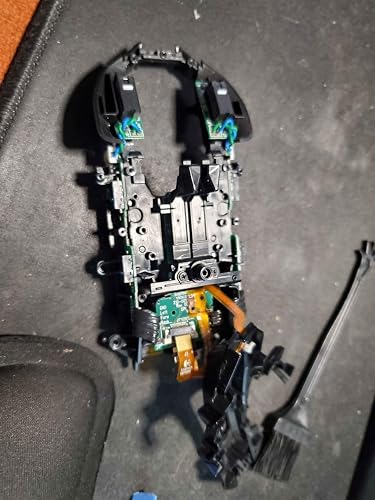


Mouse Button Board Replacement Come with D2FC-F-7N(50M) Micro Switch Compatible for G900 G903 Mouse offers an efficient solution to restore the functionality of your Logitech G900 or G903 gaming mouse. With an operation mode of ON-OFF and a mounting type designed for PCB, this replacement board is easy to install, provided you are comfortable with disassembling your mouse. Many users found that installing this replacement is straightforward after watching instructional videos. It also eliminates issues like double-clicking or missed clicks, leaving your mouse feeling new again. The included micro switches are identical to factory specs, enhancing durability and responsiveness for a seamless gaming experience.
Avaliações e Classificações dos Clientes
88 classificações de clientes
-
5 Estrela
84%
-
4 Estrela
9%
-
3 Estrela
0%
-
2 Estrela
3%
-
1 Estrela
4%
Avaliar este produto
Partilhe as suas ideias com outros clientes
Prós
- Restores functionality to G900 and G903 mice
- Easy installation without soldering required
- Eliminates double-clicking and missed clicks
- Identical feel to original factory switches
- Affordable alternative to buying new mouse
Contras
- Disassembly may be complex for inexperienced users
CONFIANÇA NA PLATAFORMA E SEGURANÇA DO COMPRADOR

JK
Jasmin
Comprador verificado
“Great products and very good service: very easy and very fast international delivery.”
9 September 2026 · via Trustpilot
AG
Anke
Comprador verificado
“Wonderful online shopping experience, smooth transaction from the start. Payment method works conveniently and delivery is unexpectedly fast and reliable. You go the extra mile for service. What makes this even more amazing, you deliver to Namibia. I will remain a happy Ubuy customer and will increase my purchases for sure! Thank you!”
10 September 2026 · via Trustpilot
H
Hazel
Comprador verificado
“Very easy to find the products what you need, and so fast delivery, that’s why I highly recommended to others costumers to used ubuy.”
10 September 2026 · via Trustpilot
O
Opaleye
Comprador verificado
“I received exactly what I ordered I was skeptical about your site because that was my first time to order. But the order came timely and neatly packaged. I was not disappointed. Thank you.”
11 September 2026 · via Trustpilot
AC
Adele
Comprador verificado
“Easy to find and order what you want on the website. Delivery is quick to the UK”
8 September 2026 · via Trustpilot
Checkout Seguro
Entrega Global
Devoluções Fáceis
Produtos Genuínos
Histórico de preços do produto
Informação importante
- Limitações: para produtos expedidos internacionalmente, tenha em atenção que qualquer garantia do fabricante pode não ser válida; opções de serviço do fabricante podem não estar disponíveis; manuais de produtos, instruções e avisos de segurança podem não estar nas línguas do país de destino; os produtos (e materiais que o acompanham) pode não ter sido concebido em conformidade com as normas, especificações e requisitos de rotulagem do país de destino; e os produtos podem não estar em conformidade com a voltagem e outras normas elétricas do país de destino (requerendo assim o uso de um adaptador ou conversor caso seja apropriado). O destinatário é responsável por garantir que o produto pode ser legalmente importado para o país de destino. Quando encomenda à Ubuy ou aos seus afiliados, o destinatário é o importador de registo e deve estar em conformidade com todas as leis e regulamentos do país de destino.
- Nem todos os produtos listados na Ubuy estão à venda, uma vez que a Ubuy é um motor de busca global. Os produtos estão sujeitos a leis de exportação/comércio.
CVE 2020
Encomende já e receba por volta de Sexta-Feira, Setembro 25
Este artigo não está restrito no meu país. (Clique no link acima se este artigo não estiver restrito no seu país, para que a nossa equipa o analise e permita.)
Qtd.:
Transação segura
Em conformidade com a norma PCI DSS e com certificação ISO 27001:2022, com pagamentos encriptados e proteção total do comprador em todas as encomendas.
Os nossos principais Parceiros Logísticos
Entrega internacional mais rápida
Recursos e benefícios
- Compatible with Logitech G900 and G903 Gaming Mouse
- Includes 1 Pair of NEW Left Right Mouse Button Board
- Comes with Original D2FC-F-7N(20M) Micro Switch
- Designed for professionals
- Solves button failure and double click issues
Ubuy Assurance
Experience worry-free shopping with 100% original products, PCI DSS-compliant payment security, ISO 27001-certified data protection, the fastest cross-border delivery, free returns *, and secure packaging on every order.