- Home Page /
- Electronics /
- Computer Accessories /
- Computer Accessories & Peripherals /
- Input Devices /
- Graphics Tablets /
- XPPen Updated Deco 01 V3 Drawing Tablet, 1638...
0 ratings




Item #:
50576894
XPPen Updated Deco 01 V3 Drawing Tablet, 16384 Pressure Sensitivity, 8 Custom Shortcuts, 220 Report Rate for OSU Drawing Pad, Remote Teaching &
90% of respondents would recommend this to a friend
Item #:
50576894
CVE 7259
Price Details
Excluding Shipping & Custom charges ( Shipping and custom charges will be calculated on checkout )
*All items will import from US
16%
In stock
 Imported from USA store
QTY:
Order now and get it around Wednesday, June 24
Secured transaction
Ubuy works hard to protect your security and privacy. Our advanced payment security system ensures confidentiality by encrypting your information during transmission using AES (Advanced Encryption Standards) and SSL (Secure Socket Layer) protocols. Your payment details are 100% secure as we do not share your payment details with third party sellers.
Our Top Logistics Partners


The XPPen Deco 01 V2 Graphics Tablet has a big and brilliant expansive tablet which is still designed to break through the limit between shortcut keys and drawing area

Fast
Shipping

Free
Return*

Secure Packaging

100% Original Products

PCI DSS Compliance

ISO 27001 Certified


Note: Step Down Voltage Transformer required for using electronics products of US store (110-120). Recommended power converters Buy Now.


What Stands Out
Large Drawing Area
The 10x6.25 inch drawing surface provides ample space for creativity, allowing artists to express their ideas comfortably without feeling restricted.
High Sensitivity
With 8192 levels of pressure sensitivity, the battery-free pen offers precise control, enabling detailed linework and responsive drawing experience that caters to both beginners and professionals.
Cross-Device Compatibility
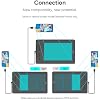
Supports Android and Chromebook, making it an ideal choice for versatile artists, teachers, and students who need a portable solution for online learning and creative projects.
Product Details
- Industry-leading: The upgraded X3 Smart Chip stylus (industry-leading innovation) delivers 16,384 pressure levels and 60° tilt support, solving traditional tablet lag and stroke distortion. Perfect for digital artists transitioning from paper to digital, allowing natural shading like charcoal/pencil without tech barriers
- Beginner-Friendly Design: Ambidextrous layout with programmable keys reduces 40% menu navigation timen, ideal for students and hobbyists juggling multiple design apps
- Optimized for Android Devices: Seamlessly connects to Android Phone/Android tablets via USB-C (includes aspect ratio adjustment). We recommend downloading the XPPen Tools app to adjust your smartphone's screen aspect ratio for precise mapping, accommodating various screen sizes in portrait mode
- 10" Active Area – 20% Larger Than Entry-Level drawing tablet: Generous 6.25x10" workspace eliminates hand-cramping for manga/anime creators, with edge-backlit surface enabling nighttime sketching sessions
- Zero Charging Hassles & On-the-Go Portability: Battery-free pen + 8mm ultra-slim body (lighter than iPad) solves beginners' "forgot to charge" anxiety. Fits in school backpacks for dorm-to-studio mobility
- Versatile Compatibility: The Deco 01 V3 is compatible with a wide range of operating systems, including Windows 7 and later, Android 10.0 and above, macOS 10.13 and newer, Chrome OS 88 and later, as well as Linux. It also works with popular design software such as Photoshop, Corel Painter, Illustrator, and Clip Studio. *Ensure your Windows is updated to version 11 or your Mac to version 12 for optimal performance
- Included Accessories: Your purchase includes: 1 x Deco 01 V3 Drawing Tablet, 1 x Stylus, 10 x Nibs, 1 x Stylus Stand, 1 x Glove, 1 x Protective Film, 1 x USB-C to USB-A Cable, 1 x USB to USB-C Adapter
| Brand | XP-Pen |
| Model Name | DECO01V3 |
| Built-In Media | 1 x Deco 01 V3 Drawing Tablet, 1 x Glove, 1 x Protective Film, 1 x Stylus, 10 x Nibs, 1 x Stylus Stand, 1 x USB to USB-C Adapter, 1 x USB-C to USB-A Cable |
| Target Audience | Artist, Student, Teacher |
| Model Number | DECO01V3 |
| Manufacturer | XP-PEN |
| UPC | 654913039529 |
| Mfr Part Number | DECO01V3 |
| Color | Black |
| Connectivity Technology | USB |
| Pressure Sensitivity | 8192 Levels |
| Operating System | Windows, Android, Linux, Chrome OS, Mac |
| Additional Features | 10" Active Area – 20% Larger Than Entry-Level drawing tablet, 16,384 pen pressure levels, 220 Report Rate for OSU, 60 degrees of tilt, 8 Custom Shortcuts |
| Specific Uses For Product | Drawing, Gaming, Online Education |
| Compatible Devices | Windows® 10/8/7, MAC OS X® 10.10 and above and Android 6.0 and above and Chrome OS 88.0.4324.109 or above. |
| Display Type | LCD |
| Native Resolution | 1920x1080 |
| Screen Size | 10 Inches (25.4 cm) |
| Item Dimensions L x W | 13.82"L x 8.54"W (35.1 cm) |
| Active Surface Area | 10 inches x 6.25 inches (25.4 cm) |
| Special Feature | 10" Active Area – 20% Larger Than Entry-Level drawing tablet, 16,384 pen pressure levels, 220 Report Rate for OSU, 60 degrees of tilt, 8 Custom Shortcuts See more |
| Package Weight | 6.51 Pound |
What's in the box
1 x Deco 01 V3 Drawing Tablet
1 x Stylus, 10 x Nibs, 1 x Stylus Stand
1 x Glove, 1 x Protective Film
1 x USB-C to USB-A Cable
1 x USB to USB-C Adapter
Who Should Buy?

-
Digital Artists
Ideal for artists seeking a high-pressure sensitivity and large drawing area for creating detailed digital art.
-
Educators
Perfect for teachers conducting online classes, enhancing lessons with interactive visuals and easy-to-use applications.
-
Students
Great for students who need a versatile tool for digital note-taking and sketching on various compatible devices.

-
Casual Users
Not ideal for those who only want a simple drawing solution without the need for advanced features.
-
3D Designers
Limited functionality for 3D design applications, which may require more advanced features than this tablet offers.
-
High-End Professionals
May not satisfy professionals needing top-tier specifications or features found in more expensive graphics tablets.
Product Description
Have any Query? Chat with us
Customer Questions & Answers
-
Question:
What are the key features of the XPPen Deco 01 V3 graphics tablet?
Answer: The XPPen Deco 01 V3 graphics tablet boasts a spacious 10x6.25 inch active area, making it ideal for detailed drawings and designs. It features 16384 levels of pressure sensitivity, allowing for precise control over line thickness and opacity. The tablet comes with a battery-free stylus, ensuring uninterrupted usage without the hassle of recharging. Moreover, it is compatible with Chromebook, making it versatile for both casual users and professional illustrators. This combination of features provides a seamless and efficient drawing experience for all skill levels. -
Question:
Is the XPPen Deco 01 V3 compatible with all operating systems?
Answer: Yes, the XPPen Deco 01 V3 is compatible with multiple operating systems, including Windows, Mac OS, and Chrome OS. This makes it an excellent choice for users who switch between different devices or platforms. Whether you are using a PC, Mac, or Chromebook, the tablet’s versatile compatibility ensures that you can create digital art seamlessly across your preferred devices. This flexibility is particularly useful for artists and designers who may need to work in various environments. -
Question:
Can I use the XPPen Deco 01 V3 for professional illustrations?
Answer: Absolutely! The XPPen Deco 01 V3 is equipped with advanced features like 16384 levels of pressure sensitivity, which cater to professional illustrators and designers. The extensive active area allows for more freedom of movement while drawing, enabling intricate details in artwork. Whether you are working on character designs, digital paintings, or graphic illustrations, this tablet provides the necessary tools for professional-quality results. Many professional users have praised it for its responsiveness and precision. -
Question:
What software can I use with the XPPen Deco 01 V3?
Answer: The XPPen Deco 01 V3 is compatible with a wide range of graphics and design software, including Adobe Photoshop, Illustrator, CorelDRAW, and many others. Whether you are into digital painting, animation, or graphic design, you will have the flexibility to choose your preferred software. This compatibility allows artists to utilize the tablet to its full potential, creating works of art with various tools and brushes available in their chosen programs. -
Question:
How does the pressure sensitivity of the XPPen Deco 01 V3 enhance my drawing experience?
Answer: The 16384 levels of pressure sensitivity on the XPPen Deco 01 V3 significantly enhance your drawing experience by providing a natural feel akin to drawing on paper. Each stroke is uniquely affected by the amount of pressure applied, allowing for varied line thickness and shading effects. This feature is particularly beneficial for intricate artwork, giving artists the ability to create subtle variations in their work. It helps in achieving professional-quality illustrations with dynamic and expressive lines. -
Question:
What accessories come with the XPPen Deco 01 V3?
Answer: The XPPen Deco 01 V3 includes several accessories to enhance your drawing experience. You'll receive a battery-free stylus, which avoids the need for frequent charging. Additionally, the tablet comes with an easy-to-use drawing glove that minimizes friction while drawing, and extra nibs for the stylus, allowing you to replace them as needed. These accessories ensure that you can start creating right out of the box without worrying about additional purchases. -
Question:
Can beginners use the XPPen Deco 01 V3 effectively?
Answer: Yes, the XPPen Deco 01 V3 is designed with beginners in mind. Its intuitive design and simple setup make it accessible for those new to digital art. The included stylus provides a fluid drawing experience, and the ample active area allows for comfortable movement. With compatible software tutorials widely available, beginners can easily learn to use the tablet and develop their skills. As skill levels improve, the tablet can also grow with the user, making it a long-term investment in their artistic journey. -
Question:
Is the XPPen Deco 01 V3 portable?
Answer: Yes, the XPPen Deco 01 V3 is compact and lightweight, making it an excellent choice for artists on the go. Its slim design allows for easy transport, whether you’re heading to a café for creative inspiration or traveling for a design project. This portability means you can take your creative workspace anywhere without compromising on the functionality or features offered by larger tablets. It's an ideal companion for artists who prefer to work in different environments. -
Question:
Does the XPPen Deco 01 V3 have customizable shortcuts?
Answer: Yes, the XPPen Deco 01 V3 features customizable shortcut keys that enhance workflow efficiency. Users can program these keys to perform specific functions or access commonly used tools in their graphic software. This level of customization allows for a personalized drawing experience, reducing the time spent navigating menus. Artists can set shortcuts for brushes, layers, or tools they frequently use, resulting in a streamlined and more productive creative process. -
Question:
Where can I buy the XPPen Deco 01 V3 in Cape Verde?
Answer: You can purchase the XPPen Deco 01 V3 at Ubuy in Cape Verde. Ubuy offers a reliable platform for acquiring this graphics tablet, providing a user-friendly shopping experience to find and select your desired product. With Ubuy's wide range of electronics, you will find this tablet along with other accessories that can complement your digital art setup. It's a great place to explore various options and make your purchase conveniently.
XP-Pen Graphics Tablets DECO01V3 Editorial Review


The XP-Pen Deco 01 V2 Drawing Tablet is a great addition to any professional or beginner's digital tools. The tablet works with Windows 10/8/7, Mac 10.10 or above, Linux, and even Chrome OS 88.0.4324.109 and higher. The package includes the tablet, stylus, pen stand, protective cover, glove, and USB cable. The tablet is easy to set up, only requiring users to download the correct software and allow permissions. Users can use the device to write in Microsoft Word or Google Docs/Slides, draw, or take notes. Though there were concerns about shipping, many of the reviews praise the product's capabilities. The pink color option adds a touch of personality to the tablet. The customizable buttons are easy to understand and helpful for users of all skill levels. However, there were a few negative reviews about tracking issues and incompatible software. The size of the tablet may also be a disadvantage for users looking to take notes.
Customer Reviews & Ratings
8184 customers ratings
-
5 Star
75%
-
4 Star
14%
-
3 Star
5%
-
2 Star
2%
-
1 Star
4%
Review this product
Share your thoughts with other customers
Pros
- Compatible with various operating systems
- Customizable shortcut buttons
- Comes with replacement nibs
- Good price range for beginner tablet
- Accurate
Cons
- Size of tablet may be too large for note-taking
Product Price History
Important information
- Limitations : For products shipped internationally, please note that any manufacturer warranty may not be valid; manufacturer service options may not be available; product manuals, instructions, and safety warnings may not be in destination country languages; the products (and accompanying materials) may not be designed in accordance with destination country standards, specifications, and labeling requirements; and the products may not conform to destination country voltage and other electrical standards (requiring use of an adapter or converter if appropriate). The recipient is responsible for assuring that the product can be lawfully imported to the destination country. When ordering from Ubuy or its affiliates, the recipient is the importer of record and must comply with all laws and regulations of the destination country.
- Not all the products listed on Ubuy are for sale, as Ubuy is a global search engine. Products are subject to export/trade regulations.
CVE 7259
Order now and get it around Wednesday, June 24
This item is not restrict in my country.(Please click on above link if this item is not restrict in your country, So our team will review and allow.)
QTY:
Secured transaction
Ubuy works hard to protect your security and privacy. Our advanced payment security system ensures confidentiality by encrypting your information during transmission using AES (Advanced Encryption Standards) and SSL (Secure Socket Layer) protocols. Your payment details are 100% secure as we do not share your payment details with third party sellers.
Our Top Logistics Partners
Fastest cross-border delivery
Features & Benefits
- Expansive tablet
- Designed to break through limits
- Tilt supported
- Android supported
- Customizable shortcut keys
- Wide compatibility